Creating PDFs from HTML Using C#
I recently decided to modernise my CV. I didn't want to sign up for CV creation tools online that might not exist in a few years' time. I wanted a process that could last, while affording me more control over layout than something like Microsoft Word would. I wanted to produce a CV using HTML and CSS, which I'd then convert to PDF.
In a nutshell: I recommend Playwright
Playwright was by far the easiest of the tools I tried to use, and the method it uses means it has proper support for modern HTML and CSS, unlike some of the other packages I tried. This meant that outside of a couple of issues, which I've provided solutions for below, it worked straight away.
Before I get into how to use Playwright, what exactly is it? From the Playwright website:
Playwright enables reliable end-to-end testing for modern web apps.
End-to-end testing? How does this help us? It means we can issue commands in code to tell a browser what to do. That happens to include issuing commands to visit a page and save it as a PDF. You might think this is a heavyweight approach to generating a PDF from HTML – it certainly feels that way considering we'll have to download an entire browser to do it. But by using an actual browser for this, instead of a third-party library that parses HTML and converts it to a PDF, we're guaranteed to have support for modern features like CSS flexbox. This makes creating complex layouts much easier.
Playwright: A working example
Here is an example to get you started. Create a new .NET console project, use NuGet to add the Microsoft.Playwright package to your project, and add the following code to your Program.Main method:
static async Task Main(string[] args)
{
    using var playwright = await Playwright.CreateAsync();

    // Chromium is Chrome without the proprietary parts
    await using var browser = await playwright.Chromium.LaunchAsync();

    var page = await browser.NewPageAsync();

    await page.GotoAsync("https://www.google.com");

    await page.PdfAsync(new()
    {
        Format = PaperFormat.A4,
        Path = @"C:\users\John\Desktop\google.pdf",
        // if we don't set this, the PDF won't be generated
        // with any background colours we've specified with CSS
        PrintBackground = true
    });
}
First, we create an instance of Playwright and attempt to launch a browser, taking care to ensure that we dispose of each by utilising appropriate using statements. If you don't do this, each time you run the program it'll load the browser, but it won't terminate it when our program exits. The rest of the code is largely self-explanatory: create a new page context, go to a page, and save it as a PDF. But if you try to run this for the first time, you'll be greeted with an exception that looks like this:
Unhandled exception. Microsoft.Playwright.PlaywrightException:
Executable doesn't exist at C:\Users\John\AppData\Local\ms-playwright\chromium_headless_shell-1155\chrome-win\headless_shell.exe
    ╔════════════════════════════════════════════════════════════╗
    ║ Looks like Playwright was just installed or updated.       ║
    ║ Please run the following command to download new browsers: ║
    ║                                                            ║
    ║     pwsh bin/Debug/netX/playwright.ps1 install             ║
    ║                                                            ║
    ║ <3 Playwright Team                                         ║
    ╚════════════════════════════════════════════════════════════╝
    // rest of stack trace
This is a nice exception message! It isn't just telling us what the problem is, it's also giving us a likely solution. In my case, the pwsh command doesn't exist on my system, even insde of an updated PowerShell command prompt. Fortunately, there is an easy fix for that.
Open a PowerShell command prompt, change to the \bin\Debug\netX\ folder in your project's directory, where netX is the version of .NET you're using, and run .\playwright.ps1 install. Once the script has finished, rerun the console application and it should save a PDF of the page you asked it to visit.
What's nice about Playwright is it doesn't take long to get started. It's concise, it's straightforward and, best of all, having full support of whatever HTML and CSS features Chromium supports means the PDFs I generated looked largely how I wanted them to with minimal effort. This was the major reason for me choosing Playwright. Other libraries I tried had mixed support for modern CSS – flexbox in particular – leading to my PDF layouts being a bit of a mess.
If you need to process a large number of pages, then the next logical step might be to allow an input file, with a list of URLs, and an output folder, to be specified on the command-line. In my case, I didn't bother as I didn't need the flexibility.
Other things you should know
My workflow consisted of using VSCode's webserver to host the HTML on localhost so I could edit it, see my changes in real-time, and use that URL as the page the Playwright browser would navigate to prior to generating a PDF. However, while writing this blog post I realised you aren't limited to fetching hosted resources – you can also specify a local file path (e.g. file:///C:/Users/John/Desktop/cv.html).
For some reason though, I found that every now and then no text would be generated in a PDF when using this approach. I don't know why that is, and as it's not the workflow I'm using, I decided not to investigate what causes it. But I thought I should mention it in case you're planning to convert local HTML files to PDFs.
To fix any other issues you encounter with the layout of a generated PDF, you'll want to add a media query in your CSS to target print media:
@media print {
    ...
}
In my case, link text that displayed nicely in my HTML file wasn't wrapping in the PDFs. To fix this I made use of overflow-wrap:
@media print {
    a {
        overflow-wrap: anywhere;
    }
}
Finally, you may want to control when a new PDF page will be created. For me, my CV was being split across pages in the middle of a job, which didn't look nice. To resolve that, I used the break-inside CSS property, and applied it to the container holding a job:
@media print {
    .job-container {
        break-inside: avoid;
    }
}
This prevents page breaks occurring inside of that container (assuming the container can fit on a single page), which gave me more control over the layout.
Using web fonts
I wanted to make use of Google fonts and had been using them for a while before I noticed a weird problem. These three sequences of characters weren't copyable: ffi, fi, and fl. For example, if I had text containing the word sufficient, I could copy su and cient individually, but I couldn't copy the ffi portion. To be clear, everything looked right. But the fact I couldn't copy those characters properly made me a bit uneasy considering this is a CV I would be to sending to potential employers.
Researching online, there are multiple issues open for Playwright (and Puppeteer, which Playwright's design is based on) that suggest this is a timing issue (i.e. the PDF starts being generated before the font has completed downloading or is fully rendered). I tried multiple things to fix this, such as ensuring the document.fonts.ready event had fired and all network requests had completed before generating the PDF. These still didn't work for me. In the end, I downloaded the fonts I wanted, and referenced them locally to see if I could take the timing aspect out of it:
@font-face {
    font-family: "Open Sans";
    src: url(fonts/OpenSans-Regular.ttf);
}
Sure enough, this fixed the problem. I'm not entirely happy with this, as it's a little inconvenient having to download fonts prior to generating a PDF. But in my case, I'd already settled on the fonts I wanted to use, so this was good enough.
What other libraries did I investigate?
The other libraries were: iTextSharp, iText, PDFSharp, and wkhtmltopdf.
Using iTextSharp and iText wasn't a smooth experience. I ran into an issue straight away because iTextSharp is marked as deprecated, with a notice recommending iText to be used instead. But when browsing NuGet for iText, I was greeted with this:
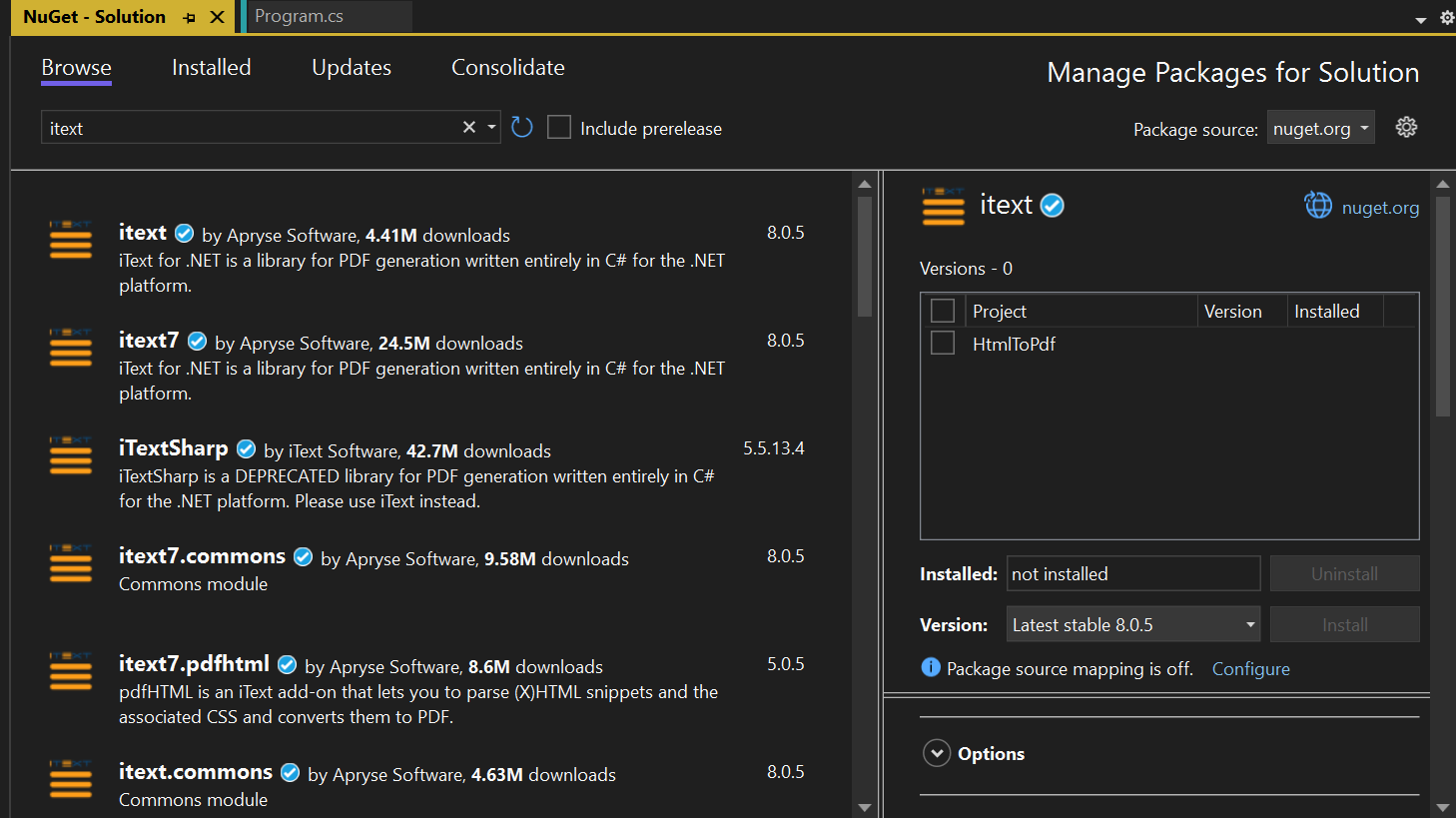
Two different packages, but they have the same author, version and publish date (not visible in the screenshot). I went with itext rather than itext7 because both packages are version 8.0.5 already, so if the 7 is indicating a version, it's redundant. But after installing itext and using some sample code, it threw an exception because of a missing dependency. While figuring out the solution didn't take long, which was to install itext.bouncy-castle-adapter, the weird package versioning and now this dependency issue didn't fill me with confidence. After getting it to generate a PDF, the layout still wasn't right, so I decided to continue looking for a better experience.
PDFSharp was next on my list to try, but the last published package on NuGet was from 2015. It has almost 4.8M downloads at the time of writing, but its website no longer exists. It specifies CSS 2 support in the package description, but doesn't mention CSS 3. Despite this package coming up several times when searching for how I might go about my quest, I decided to skip this one.
Finally, I tried wkhtmltopdf which, in contrast to Playwright, is a C library you install locally and run as a standalone executable. This was okay, but the flexbox support was mixed. I could've relaxed the constraint of wanting CSS 3 support, and I'm fairly certain this would have fixed the rendering issues. But modern CSS makes this stuff so much easier that having access to these modern features was a requirement I was unwilling to budge on.
This was when I resorted to using Playwright, which took only a few minutes to get decent results with, and I now have both the workflow and results that I hoped for.